November 13, 2026
The 5 best photo cleaner apps for iPhone in 2027
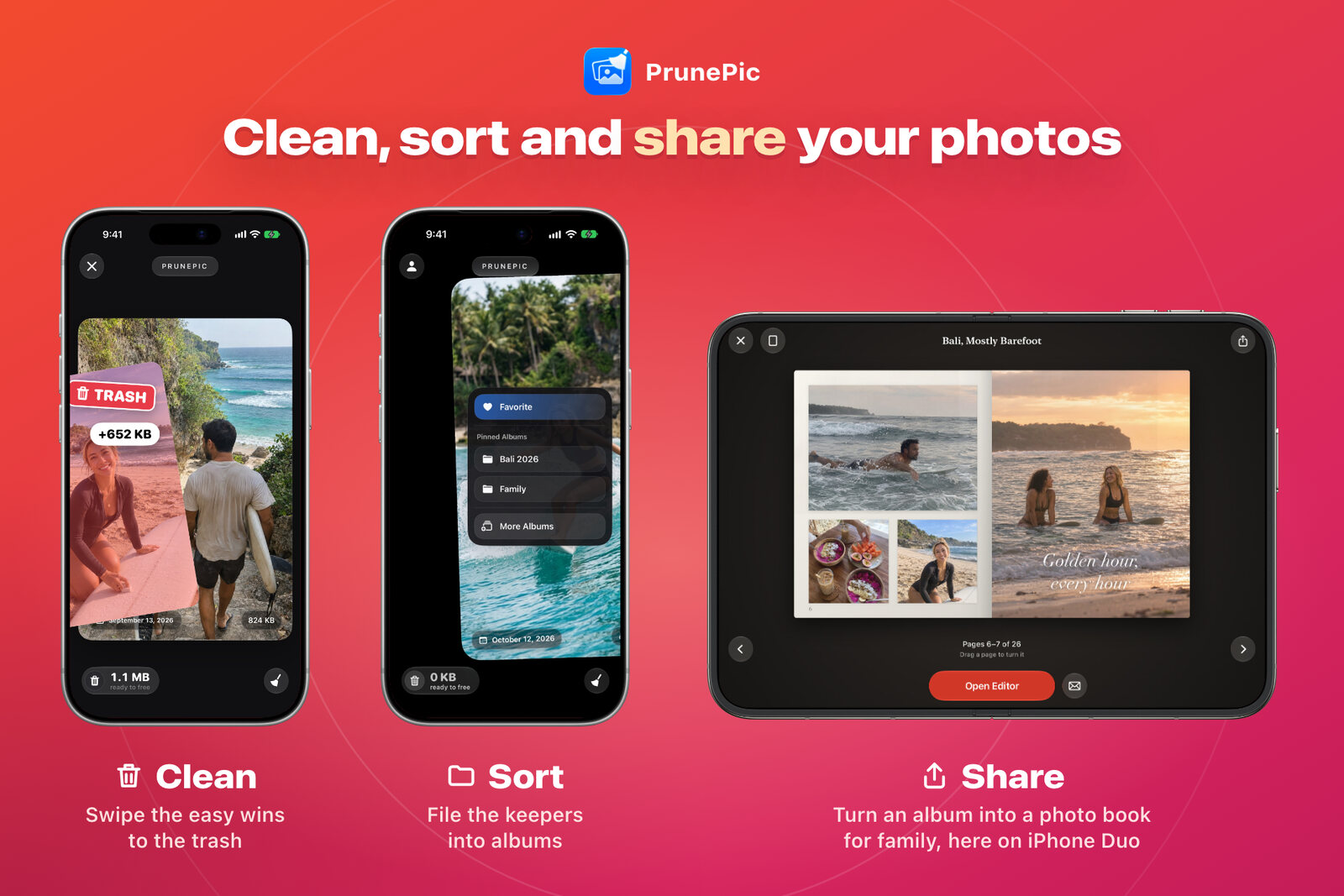
PrunePic on iPhone, iPhone Duo and iPad. Shared photobooks can be accessed with a private link on any device.
The 5 apps at a glance
PrunePic is first for the reasons in the short answer, and it’s my own app. After it, the order isn’t a ranking.
| App | How it cleans | US ratings (Nov 12) | Paid plans (US) | Free version | Apple’s ads label |
|---|---|---|---|---|---|
| 1. PrunePic | Scanner and swipe, albums, photo books | Under 100 | $29.99 a year (7-day trial), $4.99 a month, $49.99 once | 100 photos a day to the trash; an optional ad adds 40 | No |
| 2. Clever Cleaner | Scanner with a swipe mode | About 85,000 | $6.99 a week, $39.99 once | Daily scan limits; unlimited swiping | No |
| 3. Swipewipe | Swipe, duplicate piles | About 102,000 | $3.99 to $9.99 a week, $29.99 a year | Limited swipes, then a wait or an ad | Yes |
| 4. Slidebox | Swipe, file into albums | About 17,000 | From $1.99 a week, $19.99 a year or $29.99 once | Limited; no free trials | Yes |
| 5. Picnic | Swipe, keep or archive | About 10,500 | $4.99 to $7.99 a week, $9.99 a month, from $19.99 a year | 100 swipes a day, per its listing | Yes |
The 5 best photo cleaner apps for iPhone

1. Delete Photo Swipe | PrunePic
Duplicate & Screenshot Cleaner
- 5
- Updates, 12 mo
- Nov 13, 2026
- Last updated
- <100
- US ratings
- iOS 26+
- Requires
- Best for
- Cleaning, sorting into albums and making photo books, in one app
- Price (US)
- $29.99 a year with a 7-day free trial, $4.99 a month, or $49.99 once
- Free version
- 100 photos a day to the trash, unlimited keeps, album filing and one photo book; an optional short ad adds 40 more
- Developer
- Made by me
PrunePic goes through your library to line up the quickest wins: look-alike photos in a period you pick, trips and moments grouped by place and date, your screenshots, and your videos, which you can sort longest or biggest first. Then you work through each set one photo at a time. Swipe left to delete, up to keep, and right to add a photo to Favorites or file it into an album. Nothing is deleted on a swipe: everything waits in PrunePic’s trash until you empty it and confirm in iOS. It then sits in Recently Deleted for 30 days like any other deletion.
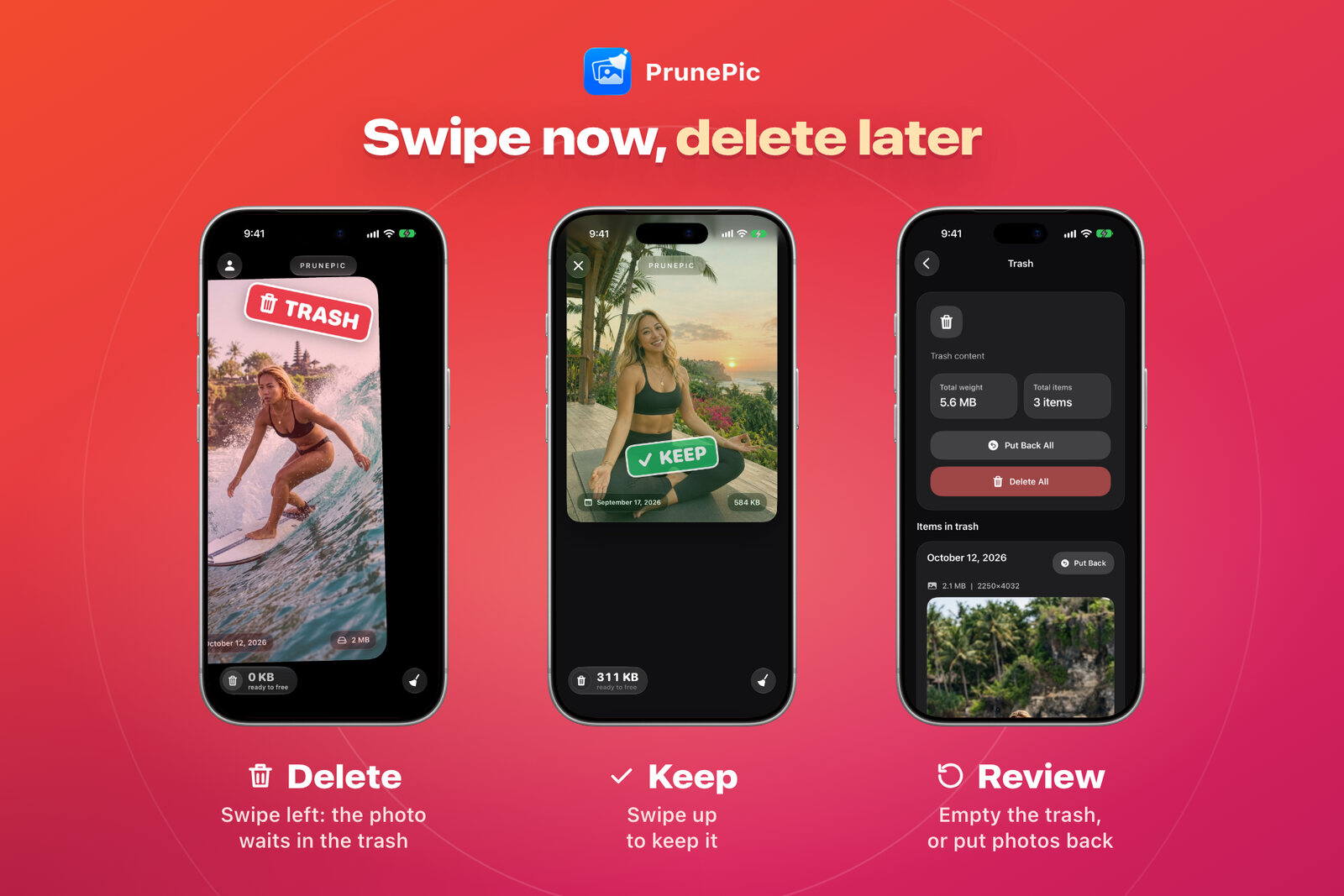
Swipe left to send a photo to the trash and up to keep it, then empty the trash or put photos back. The photos come from PrunePic’s demo libraries.
- Duplicates: pick a period (a few days, a month or a trip) and PrunePic groups look-alike photos into Same photo, Near-identical and Similar, side by side. It suggests which one to keep only when one clearly stands out, and you decide.
- Photo Books: turn an album or a trip into a book in the editor, with layouts, text and covers, and export it as a PDF or a video. You can also publish a book online and send the link to family. Publishing uploads the book to PrunePic’s servers so it can be viewed in a browser. A passcode is on by default, you choose how long the link stays up (a day, a week, a month or no limit), and you can unpublish it from the app at any time.
- Free version and ads: no ad appears while you sort. Past the free 100, you can watch a short optional ad to add 40 more for the day. Pro has no ads and no daily limit. It adds the other modes, Duplicates, more photo books and publishing books online.
- Where the others beat it: No compression, no way to turn Live Photos into still photos, and no estimate up front of how much space a cleanup would free.
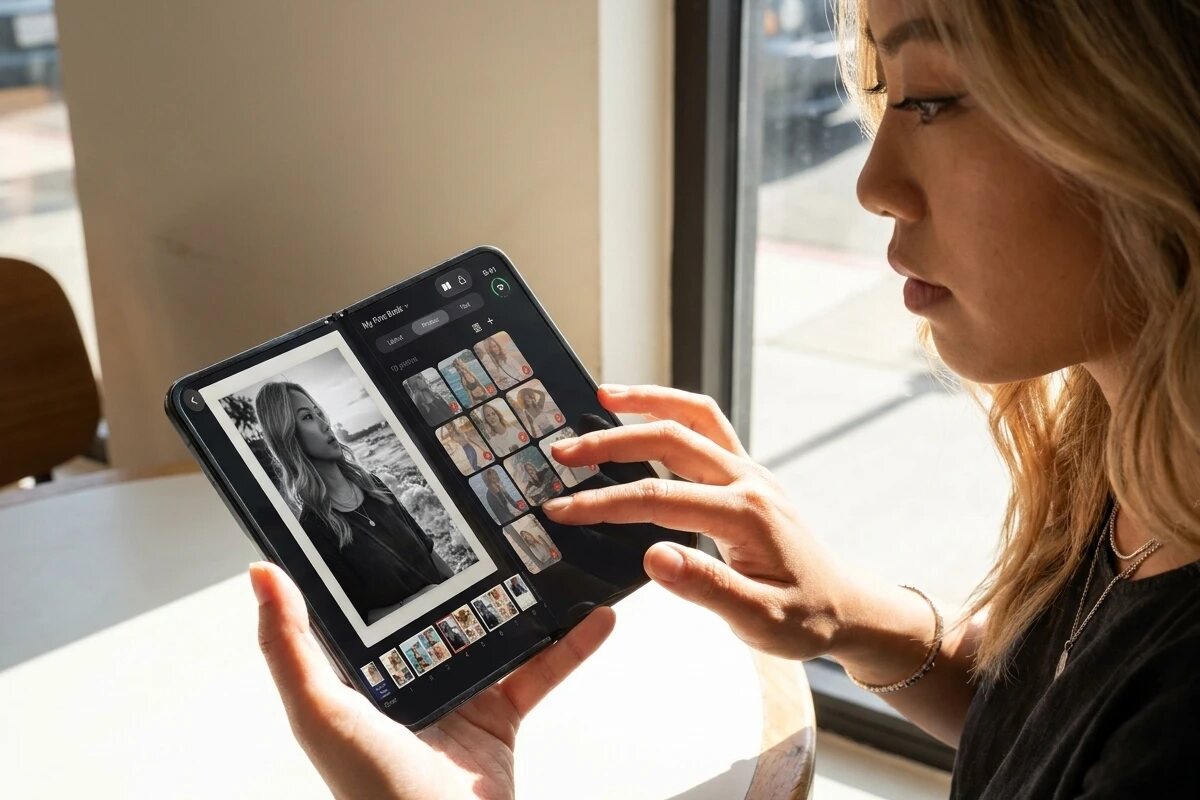
Making a photo book in PrunePic's editor, here on iPhone Duo.

Here's an example book made in PrunePic's editor. Various page layouts, positioning options and text styles are available.

Shared by private link, it opens on any device, like her grandmother's iPad.
PrunePic on the App Store · PrunePic’s website

2. Clever Cleaner: AI CleanUp App
Free Up Phone & Photo Storage
- 10
- Updates, 12 mo
- Nov 2, 2026
- Last updated
- 85K
- US ratings
- iOS 16+
- Requires
- Best for
- A generous free plan, and paying once instead of subscribing
- Price (US)
- $6.99 a week with a 3-day trial, or $39.99 once
- Free version
- Daily limits on the scan tools (1 GB a day); swiping has no limit
- Developer
- CleverFiles, the makers of Disk Drill
It groups duplicates and similar photos and suggests a best shot. It also finds large videos and screenshots, turns Live Photos into stills, compresses photos and videos, and has a swipe mode. The listing promises “No ads, pop-ups, or other distractions” and says swiping has no daily limit. It was completely free until version 3.0 in August 2026.
- Where it beats PrunePic: unlimited swiping on the free plan, no ads at all, a cheaper one-time purchase ($39.99 against PrunePic’s $49.99), and duplicates, similar photos and compression across your whole library in one scan.
- Keep in mind: the free scanning allowance is 1 GB a day, as its onboarding says. It asked to track me across other apps on its very first screen, and its paywall came before it asked for access to my photos. A few critical reviews describe compression side effects, such as duplicated files or changed dates. Its 3.6 notes say compressed files are now saved to the same albums as the originals.

3. Swipewipe: Photo Cleaner
Delete Duplicates & Free Space
- 25+
- Updates, 12 mo
- Nov 9, 2026
- Last updated
- 102K
- US ratings
- iOS 18+
- Requires
- Best for
- A short daily cleanup habit, on iPhone or Android
- Price (US)
- $3.99 to $9.99 a week, Premium items at $5.99 and $9.99, or $29.99 a year
- Free version
- A set number of swipes, then a wait or an ad
- Developer
- MWM, which also makes Picnic
The only swipe app among the top earners: number 12 in US top-grossing Utilities on November 10. You swipe right to keep and left to delete, month by month, with On This Day, streaks, widgets, bookmarks to decide later and duplicate piles. The listing also mentions similar photos and blurry shots, and recent notes mention face recognition and compression.
- Where it beats PrunePic: it runs on Android and on iOS 18, it adds similar photos, blurry shots and compression to swiping, and over 100,000 ratings show it works for a lot of people.
- Keep in mind: reviewers describe the free limit as roughly 20 swipes or one list, then a wait of several hours or an ad. Since September 2026, some report watching an ad before a deletion completes. When I installed it, the first screen asked me to consent to sharing data with 204 ad partners (the European version of that screen), and iOS’s prompt asking to track me across other apps came right after the paywall.

4. Slidebox: Photo Cleaner App
Photo Swipe, Delete, Organizer
- 23
- Updates, 12 mo
- Nov 9, 2026
- Last updated
- 17K
- US ratings
- iOS 15+
- Requires
- Best for
- Filing photos into albums as you clean, with a one-time price
- Price (US)
- From $1.99 a week, $19.99 or $29.99 a year, or $29.99 or $49.99 once; no free trials
- Free version
- Roughly your last year of photos, per reviewers
- Developer
- Slidebox LLC
One of the original swipe apps, on the App Store since 2015. You swipe up to trash and down to favorite, tap to file a photo into an album, undo, and empty a trash before anything is deleted. Its privacy label declares no data used to track you. Its latest update notes say “No ads”, though its App Store listing still said it contains ads on November 12.
- Where it beats PrunePic: a cleaner privacy label than mine (PrunePic lists Identifiers under “Data Used to Track You” because I installed the Facebook SDK to promote the app at some point), a one-time purchase from $29.99, iOS 15 support and more than ten years of polish on album filing.
- Keep in mind: in earlier versions, some reported the final delete button not working, which the developer has fixed several times. When I installed it, it showed no paywall during onboarding, which is rare in this category. Its design feels older than the others, and it leans more toward organizing than cleaning. Part of my library didn’t load in its Photos tab timeline.

5. Picnic: Clean Up Storage
Free up space, sort photos
- 25+
- Updates, 12 mo
- Nov 5, 2026
- Last updated
- 10.5K
- US ratings
- iOS 17+
- Requires
- Best for
- Playful swiping where you only choose keep or archive
- Price (US)
- $4.99 to $7.99 a week, $9.99 a month, or $19.99 to $39.99 a year
- Free version
- 100 swipes a day, per its listing
- Developer
- MWM, the company behind Swipewipe
You swipe left to archive and right to keep, double-tap to add a photo to your Favorites in Photos, and empty the archive in one tap. Its description promises “Ad-Free & Free Swipes”, though its App Store listing says it contains ads.
- Where it beats PrunePic: iOS 17 support, a yearly plan from $19.99 on its listing, and over 10,000 ratings.
- Keep in mind: when I installed it, it asked to track me on its first screen, then showed the consent screen for 204 ad partners, then asked me to rate it before I had cleaned anything. Its last screen offered a free 3-day trial or a 30-day trial for $2.99, and the weekly price, CHF 7.00, only appeared in the small print. Its yearly and monthly plans weren’t on that screen.
How to pick the right one
Start with Apple Photos, for free
Before you download anything, look at what your iPhone already does. In Photos, Collections › Utilities › Duplicates finds exact copies and lets you merge them. Collections › Media Types gathers videos, screenshots, screen recordings and bursts to delete in bulk.
- Pick it if: your problem is mostly exact duplicates, or a pile of screenshots and videos you’d happily delete in one go.
- Where it beats PrunePic: it’s free, has no limit, is already on your phone and checks your whole library for duplicates at once. PrunePic’s Duplicates mode is part of Pro and works one period at a time.
- Keep in mind: it doesn’t group similar shots, sort videos by size, or remember which photos you’ve already looked at.
Match the app to the job
| You want | Look at |
|---|---|
| Only exact duplicates gone | Apple Photos’ Duplicates album, for free |
| The app to find the easy wins | Clever Cleaner for a whole-library scan; PrunePic to go through each set yourself |
| To swipe through years of photos | PrunePic or Swipewipe; Slidebox for albums as you go |
| Photos filed into albums as you clean | PrunePic or Slidebox |
| A photo book to share with family | PrunePic, the only one here with a photo book editor |
| No subscription | Clever Cleaner ($39.99), Slidebox (from $29.99) or PrunePic ($49.99), paid once |
| No ads | Clever Cleaner, per its listing. PrunePic’s only ad is optional, after the free limit |
What a year really costs
What you pay depends less on the price list than on the plan an app selects for you on its first screens. Start the free trial on that plan, stay a year, and this is the bill:
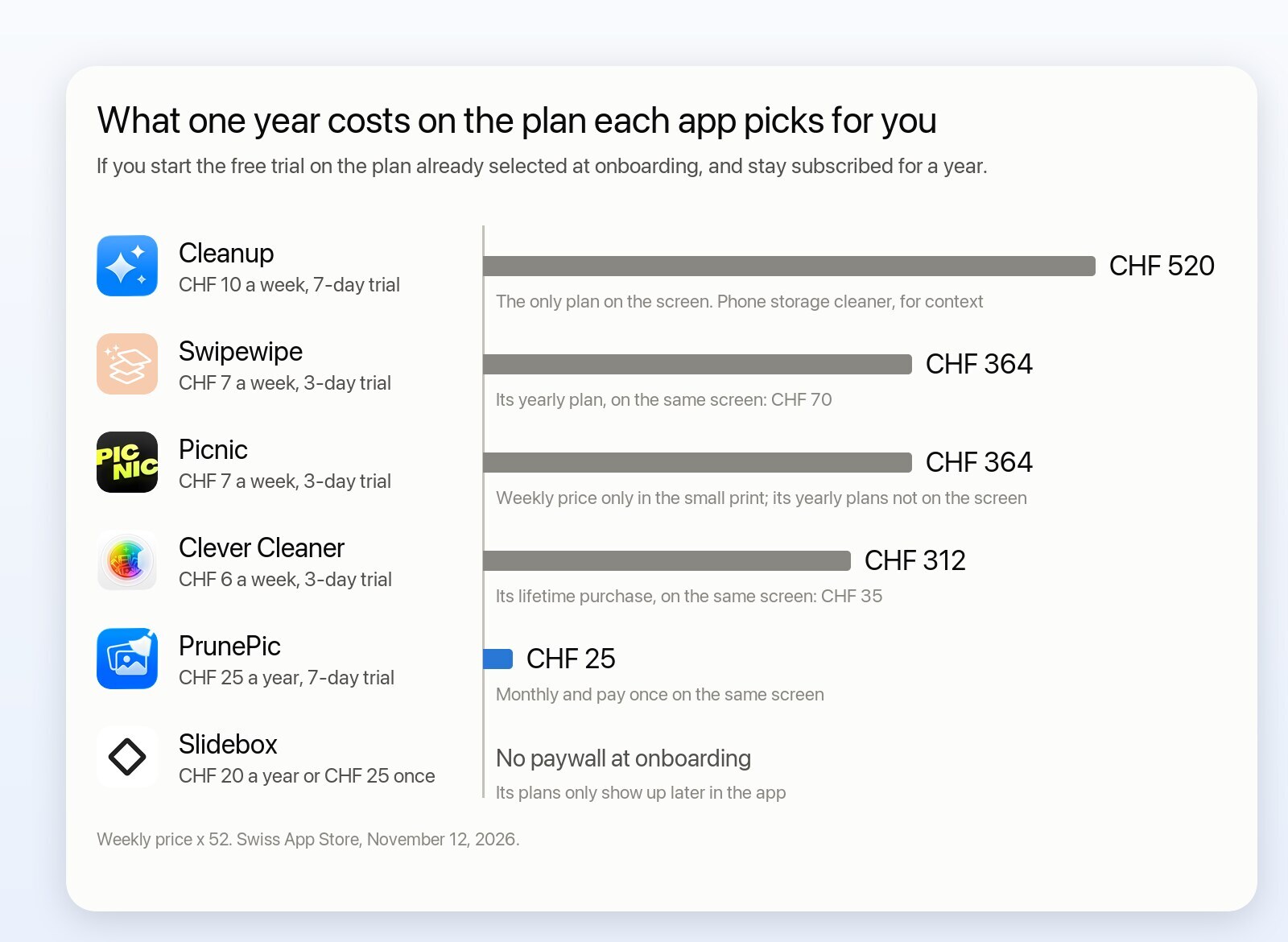
Weekly price × 52. Swiss App Store, tested November 12, 2026. Cleanup is a phone storage cleaner, shown for context.
Swipewipe and Clever Cleaner both showed their plans before I had cleaned a photo, with the weekly plan selected. That’s CHF 364 a year for Swipewipe, about five times its own yearly plan (CHF 70), which sits just below it marked “Best value”. Clever Cleaner’s comes to CHF 312, about nine times its one-time price (CHF 35), also marked “Best Value”. The cheaper option is on the screen, just not the one selected for you. In US dollars, that’s about $519 and $363 a year.
Picnic, from Swipewipe’s maker, says “Try For $0.00” in large letters, with “then CHF 7.00 per week” in small print, and showed no yearly or monthly plan: CHF 364 a year. Cleanup, a storage cleaner shown for context, offered a single plan at CHF 10 a week, about CHF 520 a year.
PrunePic selects its yearly plan: CHF 25 ($29.99 in the US) after a 7-day free trial, the cheapest default here. Its paywall is the last of eight onboarding screens, after a few features, a question about where you’d like to start, photo access, a first look at where to begin, notifications, a page about me and a screen to personalize the app. Slidebox costs less still: it showed no paywall during onboarding, and its plans later in the app start at CHF 20 a year.
Why so many expensive weekly subscriptions?
This is my view as a developer, not something these companies have said. Apps that grow through ads pay for every download, and they bid against each other to put their app in front of you instead of someone else’s, which pushes the cost of each install up. To earn that back quickly, they need you paying from the first week, and a weekly plan after a short trial does that faster than anything else. Swipewipe alone had about 240 active ads in Meta’s US ad library on November 10. At that scale it works, which is why so many apps do it. But I don’t feel good about charging around $10 a week for an app like this, so PrunePic has no weekly plan: a yearly plan with a week to try it, a monthly plan, or a one-time price.
Paywall patterns to watch for
Some of these are dark patterns: the screen makes the expensive choice the easy one. Where PrunePic does the same, the table says so.
| Pattern | Clever Cleaner | PrunePic | Swipewipe | Slidebox | Picnic | Cleanup |
|---|---|---|---|---|---|---|
| Weekly plan selected for you | Yes | No | Yes | No | Yes | Yes |
| Free trial switched on for you | No | No | Yes | No | Yes | Yes |
| Cheaper plan marked “Best value” but not selected | Yes | No | Yes | No | No | No |
| Cheaper plan missing from the screen | No | No | No | No | Yes | Yes |
| Weekly price only in the small print | No | No | No | No | Yes | No |
| Tracking request before you use the app | Yes, first screen | Only before the optional ad | Yes, after the paywall | Not noted | Yes, first screen | Yes, first screen |
| Consent screen for 204 ad partners first | No | Only before the optional ad | Yes | Not noted | Yes | No |
| Rating request before you use the app | No | No | No | Not noted | Yes | No |
| Paywall before your first cleanup | Yes | Yes | Yes | No | Yes | Yes |
| Close button on every paywall screen | Yes | Yes | Yes | No paywall | Last screen only | Yes |
Before you start any trial
- Check which plan is pre-selected and what it costs after the trial. “3 days free” on a weekly plan means a weekly charge from day four.
- Look for the close button. You can almost always use the free version without a trial.
- To cancel a trial, go to Settings › [your name] › Subscriptions.
How I compared them
The other apps’ facts come from their US App Store listings, read on November 12, 2026, and from a study of critical App Store reviews (1 to 3 stars, up to October 24, 2026, from 11 countries) that I ran for PrunePic’s website. I installed Swipewipe, Clever Cleaner, Picnic, Slidebox and Cleanup myself on November 12, on the Swiss App Store, to check their first screens. Prices are US prices unless I quote the Swiss store, and apps test different offers on different people, so check the current listing before you install.
PrunePic’s website also has a longer comparison of ten iPhone photo cleaners, storage cleaners included.
This list is about photos. All-in-one storage cleaners such as Cleanup, Cleaner Kit, AI Cleaner and CleanMy®Phone also go after contacts, email and calendars, so they’re not here. Some of their photo tools are good, and PrunePic doesn’t have them: Cleanup turns Live Photos into stills and estimates the space its duplicates would free.
Why I built PrunePic anyway
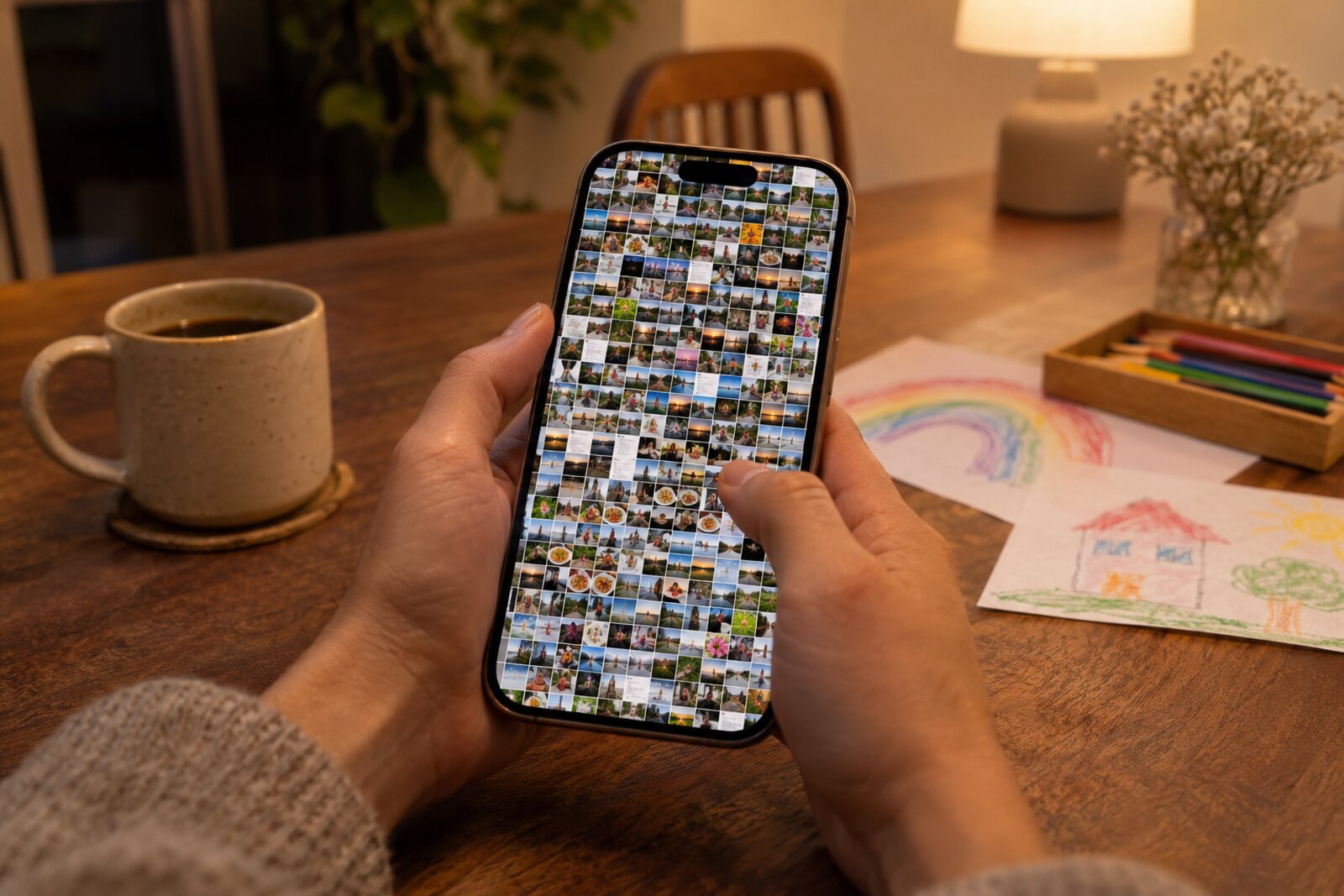
Illustration, generated with AI.
Swipewipe alone has over 100,000 ratings, so why build another photo cleaner? I didn’t invent this kind of app, and PrunePic doesn’t beat a whole-library scanner at finding duplicates.
I’m an independent iOS developer. I live in Switzerland with my wife and our two kids, and our families live in Belgium and India, so the grandparents don’t see their grandchildren as often as they’d like. Photos are a big part of how we bring them closer.
My own library is part of the problem: about 70,000 photos, and years of paying for iCloud+, partly for screenshots I’ll never look at again. We print photo books too. The family loves them, but they’re expensive, and once they’re on a shelf they mostly gather dust.
I tried a lot of cleaner apps first, and their pricing bothered me most. As a developer, I know the core of these apps isn’t hard to build, so I made my own, on my own terms, with the features I know parents will use most. I’m my own user here.
PrunePic lets me go through our photos myself, keep the good ones in albums, and turn the best into a photo book that family opens by a private link, with nothing to print. Our first one, made during the beta after a trip to Japan, went to my wife’s parents. They loved it.
I charge for Pro because that’s how I keep working on it: it pays for development and for the servers that host shared photo books. There’s no weekly plan, you can pay once, and the free version stays usable, with an optional ad for people who can’t or don’t want to pay.
I think a lot about how AI is changing the world, and about what will stay the same once everything else has changed. I believe making memories and sharing them with the people we love is one of those things. It’s human to human. How we capture and share them will keep changing, but the act itself won’t go away, and that’s why I think an app like this matters.
Do you work on one of these apps, or have you spotted something out of date? Email me at ebapps.customers@gmail.com and I’ll check it and correct the post.
App icons belong to their developers and come from their App Store listings.